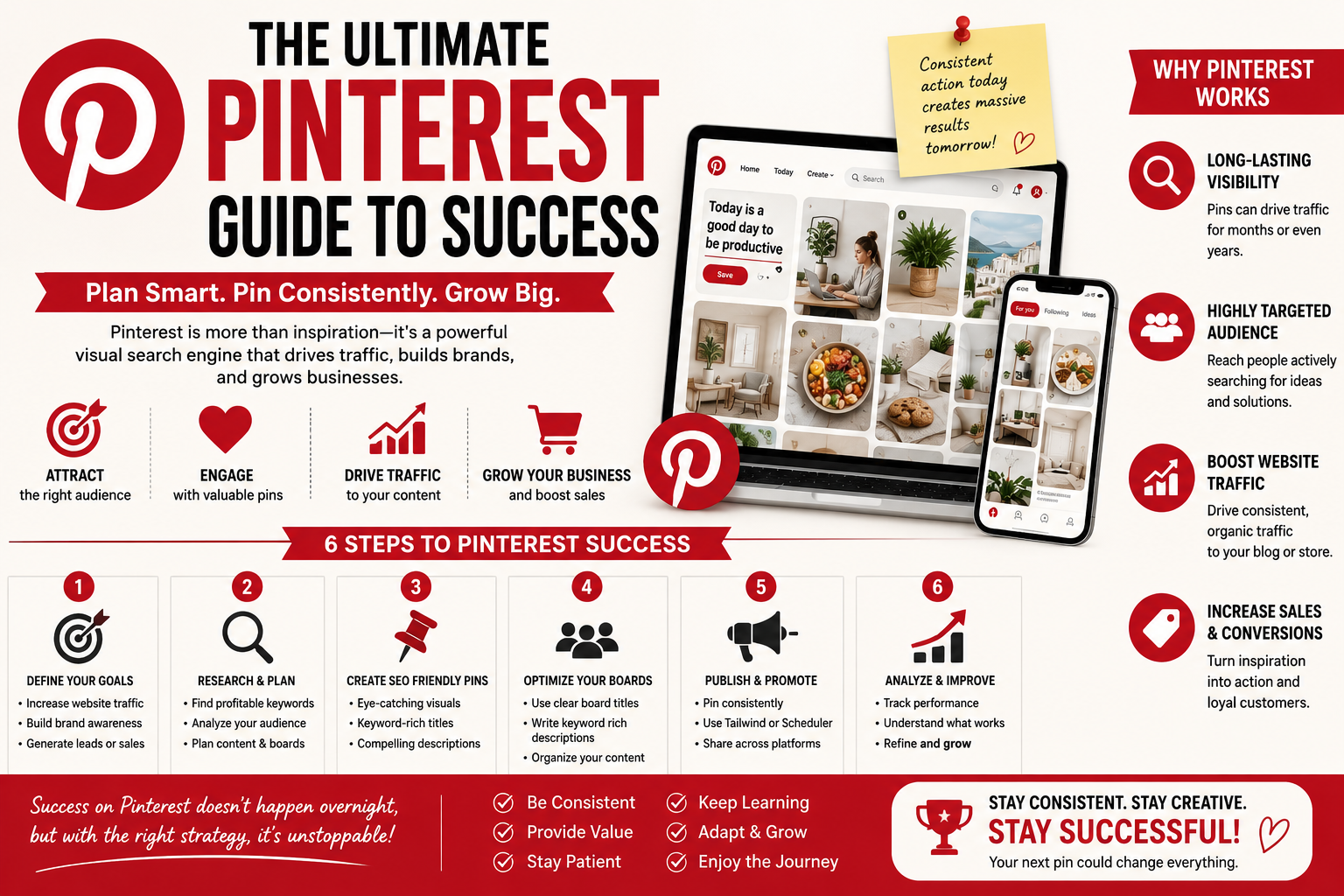
Unlock the incredible potential of Pinterest and transform your online presence! As a powerful visual search engine, Pinterest offers a unique opportunity to connect with an audience actively seeking inspiration and solutions, making it an invaluable tool for growing your audience, boosting engagement, and driving significant traffic to your website or blog. Unlike traditional social media platforms, Pinterest users arrive with intent, often planning purchases or projects, which means your content can reach high-intent shoppers ready to take action. By understanding and implementing smart strategies, even beginners can leverage Pinterest to achieve remarkable results for their business. This guide will walk you through everything you need to know to get started and thrive on Pinterest.
Table of Contents
- Understanding Pinterest as a Visual Search Engine
- Setting Up Your Pinterest Business Account for Success
- Optimizing Your Profile and Boards for Discovery
- Crafting Compelling Pins That Convert
- Mastering Pinterest SEO and Keyword Strategy
- Boosting Engagement and Building Community
- Leveraging Pinterest Analytics for Growth
- Driving Traffic and Conversions to Your Website
- Frequently Asked Questions (FAQ)
- Key Takeaways
1. Understanding Pinterest as a Visual Search Engine
Many people mistakenly view Pinterest as just another social media platform, but this overlooks its true power. Pinterest primarily functions as a visual search engine, much like Google or YouTube, where users actively search for ideas, products, and solutions. This key distinction is crucial for your marketing strategy, as it means users are in a discovery mindset, looking for content that solves a problem or inspires a project, rather than passively scrolling through a social feed.
The content you create on Pinterest has an impressive lifespan, often driving traffic and engagement for months or even years after it's published. This evergreen nature makes Pinterest a long-term asset for your business, providing consistent visibility and potential conversions. By focusing on valuable, inspiring, and actionable content, you can tap into an audience that's ready to plan, save, and eventually purchase. This longevity is a massive advantage compared to the fleeting nature of posts on many other social platforms.

2. Setting Up Your Pinterest Business Account for Success
The first step to harnessing Pinterest's marketing power is to set up a dedicated business account. If you're currently using a personal account, it's easy to convert it, allowing you to access vital tools like analytics and advertising features. A business account provides crucial insights into your audience and pin performance, which are essential for refining your strategy and measuring your success, giving you a clear roadmap for growth.
When creating your business profile, ensure it's fully optimized to attract your target audience. Upload a clear, professional logo or a high-quality picture that represents your brand as your profile image. Your business name should be consistent with your other online platforms, and consider including relevant keywords in your profile name and bio to enhance discoverability. The bio offers up to 500 characters to describe your business and entice users, so make it concise, attractive, and keyword-rich. Don't forget to add your website link and verify it, which is crucial for tracking traffic and gaining access to more analytics.
3. Optimizing Your Profile and Boards for Discovery
A well-optimized Pinterest profile and strategically organized boards are fundamental for attracting and retaining your audience. Think of your profile as your storefront and your boards as carefully curated displays. Choose a compelling cover photo that reflects your brand and consider branding your board covers for a cohesive look, creating a professional and inviting presence.
Create boards that are highly relevant to your niche and target audience, using keyword-rich titles and descriptions. Instead of generic titles like "Recipes," opt for specific ones such as "Quick Healthy Dinner Recipes" or "Easy Wedding Hairstyles for Brides." Each board description should be 2-3 sentences long and packed with relevant keywords to improve search visibility. Aim to start with at least five boards, each containing a minimum of 20 pins, to provide a substantial foundation for your presence. Regularly showcasing your best boards, perhaps rotating those featuring trending content or top-performing pins, can also increase visibility and attract new followers.
4. Crafting Compelling Pins That Convert
On a visual platform like Pinterest, the quality and design of your pins are paramount to grabbing attention and encouraging clicks. High-quality, eye-catching images are non-negotiable; avoid blurry or low-resolution visuals. Pinterest recommends a 2:3 aspect ratio, such as 1000 x 1500 pixels, for vertical pins, as these take up more space in the feed and tend to perform better, making your content stand out.
Incorporate clear, easy-to-read text overlays that convey your main message or highlight a key benefit. This helps users understand your pin's content at a glance, especially on mobile devices where most Pinners access the platform. Always include your logo subtly on your pins to reinforce brand recognition and build trust. Don't be afraid to create multiple pins for the same piece of content, experimenting with different visuals, text overlays, and angles to see what resonates best with various audience segments. Video Pins and Idea Pins are also gaining traction, offering dynamic ways to showcase how-to content, tutorials, or product demonstrations, providing even more avenues for engagement.

5. Mastering Pinterest SEO and Keyword Strategy
Given that Pinterest is a visual search engine, optimizing your content with relevant keywords is non-negotiable for discoverability. Without a strong keyword strategy, even the most beautiful pins may go unnoticed. The goal is to align your content with what users are actively searching for, ensuring your pins appear exactly when your target audience is looking for solutions.
Start your keyword research directly on Pinterest. Use the search bar to type in broad terms related to your niche and observe the auto-suggestions and colored "guided search" bubbles that appear. These are actual phrases users are searching for, providing invaluable insights into long-tail keywords. Additionally, the Pinterest Trends tool can help you identify popular and upcoming topics, allowing you to time your content strategically. Incorporate these keywords naturally into your pin titles, descriptions (around 300 characters, avoiding keyword stuffing), board titles, and board descriptions, as well as in the image file names, to maximize your search potential.
Engagement on Pinterest goes beyond likes; it's about encouraging saves, close-ups, and outbound clicks, which demonstrate genuine user intent and interest. Consistency is key to maintaining
audience engagement and reaching new people; aim to pin regularly, ideally 1-10 times a day, focusing on quality over sheer volume. Scheduling tools can help you maintain a steady publishing schedule without constant manual effort.Engaging with the
Pinterest community is also vital. This includes repinning content from others in your niche (aim for an 80/20 mix of other people's content to your own), responding to comments, and even joining or creating group boards to collaborate and expand your reach. Use clear calls to action (CTAs) within your pin descriptions and text overlays to prompt users to save, click through to your website, or explore further. Remember, Pinterest users are looking for inspiration and solutions, so provide valuable content that genuinely helps them and encourages interaction.

To truly refine your Pinterest marketing strategy, you must regularly monitor your performance using
Pinterest Analytics. This free tool, available with your business account, provides a wealth of data to help you understand what's working and what needs adjustment, taking the guesswork out of your strategy.
Focus on key metrics beyond just followers or monthly views, such as impressions (how many times your pins were shown), engagements (saves, close-ups, link clicks), and most importantly, outbound clicks, which indicate traffic to your website. Pinterest Analytics also offers audience insights, revealing demographics, interests, and behaviors of your audience, which can inform your content creation and targeting. By analyzing your top-performing pins and boards, you can identify patterns and replicate successful strategies, constantly optimizing your content for better engagement and traffic.
8. Driving Traffic and Conversions to Your Website
The ultimate goal of Pinterest marketing for many businesses is to drive traffic and conversions. Pinterest is uniquely designed to send users off the platform to your website, blog, or product pages. Ensure every pin you create has a clear destination link, making it easy for interested users to explore further.
Utilize Rich Pins, which automatically pull additional information from your website, like product pricing or recipe ingredients, making your pins more informative and appealing directly in the feed. Consistently creating fresh pins, even if they link to existing content, helps keep your profile active and visible, signaling to Pinterest that you're a valuable content creator. Consider incorporating Pinterest ads as a way to boost brand awareness and accelerate traffic, as Pinterest often delivers more efficient cost per conversion compared to other platforms, turning browsers into buyers. By consistently providing valuable, keyword-optimized content and clear pathways to your website, you can transform Pinterest into a powerful engine for lead generation and sales.
Frequently Asked Questions (FAQ)
Q1: How many pins should I post daily?
A1: Consistency is more important than a specific number. Aim to pin regularly, balancing quality with quantity. Many experts suggest 1-10 pins per day, with some recommending a mix of new and repinned content.
Q2: Do I need to use hashtags on Pinterest?
A2: Pinterest functions primarily as a visual search engine driven by keywords, not hashtags. While you might see them, focus on incorporating relevant keywords naturally into your pin titles, descriptions, and board descriptions for optimal search visibility.
Q3: How long does it take to see results from Pinterest marketing?
A3: Pins can start driving traffic in as little as 24 hours, but peak performance often comes around 30-90 days, or even months to years later, due to Pinterest's evergreen nature. Patience and consistent effort are key.
Q4: Do I need a blog or website to use Pinterest for marketing?
A4: While you can use Pinterest without a blog, it's highly recommended to have a website or blog to maximize traffic and conversions. Pinterest is designed to send users to external links, making it an excellent platform for driving traffic to your own content or products.
Key Takeaways
- Pinterest is a visual search engine, not just social media. Your content has a long lifespan, making it an evergreen marketing asset.
- A Pinterest Business Account is essential for accessing analytics and other marketing features.
- Optimize your profile and boards with keyword-rich titles and descriptions for maximum discoverability.
- Create visually appealing, vertical pins (2:3 aspect ratio) with clear text overlays and your brand logo.
- Master Pinterest SEO by researching and strategically using keywords in your pins, boards, and profile.
- Prioritize consistent pinning, community engagement, and clear calls to action to boost interaction.
- Regularly analyze your Pinterest Analytics to understand performance and refine your strategy based on data.
- Focus on driving traffic and conversions by linking pins directly to your website and utilizing Rich Pins.



 Alex Martun

 Alex Martun