In the dynamic world of online video, a powerful thumbnail isn't just a detail; it's a game-changer. It's the silent salesperson that determines whether your content gets discovered or lost in the vast digital ocean. This article will unveil the secrets behind crafting compelling YouTube thumbnails that not only grab attention but also significantly boost your video's Click-Through Rate (CTR) and overall performance on the platform. Get ready to master the art of the perfect visual hook and propel your channel to new heights!
Table of Contents
The Unseen Powerhouse: Why Thumbnails Are Crucial
Cracking the YouTube Algorithm: The CTR Connection
The Anatomy of a High-Performing Thumbnail
Clarity, Simplicity, and Visual Hierarchy
Emotional Connection and Compelling Text
Strategic Color, Contrast, and Branding
Technical Specifications for Maximum Impact
The Art of A/B Testing: Let Your Audience Decide
Beyond the Click: The Content-Thumbnail Harmony
Frequently Asked Questions (FAQ)
Key Takeaways
1. The Unseen Powerhouse: Why Thumbnails Are Crucial
In the bustling world of YouTube, where hundreds of hours of content are uploaded every minute, standing out is no longer a luxury – it's a necessity. Your video's thumbnail is arguably the most critical element in this quest for visibility. Think of it as your video's movie poster or book cover – it's the first impression, the silent salesperson that either stops the scroll or lets potential viewers pass by. Without a compelling thumbnail, even the most brilliant content can remain undiscovered.
A well-crafted thumbnail is more than just a pretty picture; it's a powerful marketing tool that can significantly influence a viewer's decision to click and watch your video. It's your one shot to grab attention, convey your video's essence, and spark curiosity in a fraction of a second. This tiny image holds immense power, directly impacting your video's initial performance and its long-term success on the platform.
2. Cracking the YouTube Algorithm: The CTR Connection
YouTube's algorithm is a sophisticated system designed to connect viewers with content they'll love, and your thumbnail plays a direct role in this process. One of the key metrics the algorithm monitors is Click-Through Rate (CTR), which measures how often viewers watch your video after seeing its thumbnail. A high CTR signals to the algorithm that your content is relevant and appealing, leading to increased impressions and more views. This creates a positive feedback loop: better thumbnails lead to more visibility, which in turn leads to more views.
However, it's crucial to understand that while CTR is important, it's not the only factor. YouTube's system ultimately optimizes for expected watch time per impression, which combines CTR with average view duration. This means your thumbnail must not only attract clicks but also accurately represent your video's content to ensure viewers stay engaged. Clickbait thumbnails might generate initial clicks but often lead to low watch time, which can ultimately harm your video's performance and reduce its recommendations over time.
3. The Anatomy of a High-Performing Thumbnail
Creating a thumbnail that truly stands out involves a blend of design principles and psychological appeal. It's about making smart choices that capture attention and communicate value instantly.
Clarity, Simplicity, and Visual Hierarchy
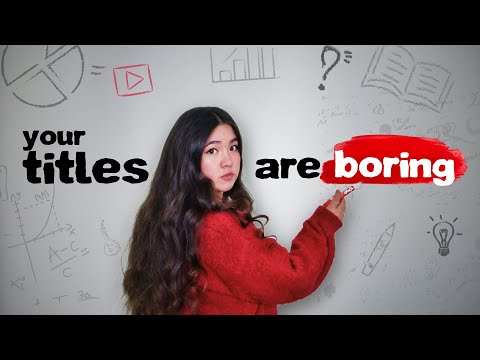
The most effective thumbnails are often the simplest. In a crowded feed, a clear focal point guides the viewer's eye to the most important element, preventing visual overload. Avoid cluttering your thumbnail with too many elements; aim for a maximum of three to five key components. High-quality images are non-negotiable, ensuring your thumbnail looks professional and crisp across all devices, from small mobile screens to large TVs. Remember, your thumbnail will be heavily compressed and rendered small in most display contexts, so simplicity enhances readability.
Emotional Connection and Compelling Text
Human faces, especially those displaying clear emotions, consistently perform better, often increasing CTR by 25-30%. Viewers naturally connect with other people, and an expressive face can quickly convey the video's tone or promise an engaging experience. When it comes to text, less is truly more. Aim for bold, readable text with a maximum of 3-4 words that pique curiosity or highlight the video's main benefit, without simply duplicating your video's title. Use large, clear, sans-serif fonts that are legible even on the smallest screens.
Strategic Color, Contrast, and Branding
Colors are powerful tools that can make your thumbnail pop in a sea of content. Utilizing high-contrast colors, such as bright subjects on dark backgrounds or vice-versa, helps your thumbnail stand out and makes text easily readable. Red, yellow, and bright blue elements are often seen in top-performing thumbnails due to their attention-grabbing nature. Consistent branding across your thumbnails, using similar color schemes, fonts, or visual elements, builds channel recognition and helps returning viewers easily identify your content. However, most experts advise against placing your channel logo directly on the thumbnail, as it can contribute to clutter and your logo already appears next to the video title.
4. Technical Specifications for Maximum Impact
Getting the technical details right ensures your thumbnail looks its best across all YouTube surfaces. The recommended YouTube thumbnail size is 1280 pixels wide by 720 pixels tall, with a minimum width of 640 pixels. This size maintains a 16:9 aspect ratio, which is YouTube's native video aspect ratio and ensures your thumbnail displays correctly without awkward black bars or cropping.
Your thumbnail file size should be kept under 2MB, and accepted formats include JPG, PNG, GIF, or BMP. PNG is generally recommended for designs that feature sharp text or high-contrast visuals, as it preserves image quality effectively.
5. The Art of A/B Testing: Let Your Audience Decide
Guessing which thumbnail will perform best is a gamble you don't have to take. A/B testing is a powerful strategy that allows you to compare different thumbnail variations to see which one resonates most with your audience. YouTube Studio offers a built-in A/B testing feature that lets you upload two or even three thumbnail variants for the same video. This tool automatically serves different options to various segments of your audience and measures which variant generates the most watch time, not just clicks.
To conduct an effective A/B test, focus on changing only one variable at a time – either the thumbnail or the title – to accurately determine what caused any performance shift. Results typically become available within a couple of weeks, and YouTube often automatically implements the winning thumbnail once the test concludes. Regular testing and analysis of your YouTube Analytics data are vital for understanding what truly drives your audience's clicks and engagement, allowing you to continually refine your thumbnail strategy.
While a high CTR is a strong indicator of an effective thumbnail, it's only one piece of the puzzle. The ultimate goal is to attract viewers who will genuinely engage with your content. This means your thumbnail and title must work in harmony, accurately setting expectations for what your video delivers. Misleading or "clickbait" thumbnails might initially boost your CTR, but if the video doesn't deliver on its promise, viewers will quickly leave, leading to a low average view duration.
YouTube's algorithm is smart; it quickly learns when a video attracts clicks but fails to retain viewers. When this happens, it reduces the likelihood of recommending your content to others, ultimately harming your long-term growth. Therefore, always ensure there's a strong alignment between your thumbnail, title, and the actual content of your video. Your thumbnail is a promise – make sure your video delivers on it within the first few seconds to maximize watch time and encourage the algorithm to continue promoting your valuable content.
Frequently Asked Questions (FAQ)
Q: What are the ideal dimensions for a YouTube thumbnail?
A: The recommended dimensions for a YouTube thumbnail are 1280 x 720 pixels, with a minimum width of 640 pixels, maintaining a 16:9 aspect ratio.
Q: How important is text on a YouTube thumbnail?
A: Text can be very effective for conveying your video's main idea or sparking curiosity, but it should be used sparingly. Aim for bold, readable text with 3-4 words maximum, ensuring high contrast with the background for legibility.
Q: Does using faces in thumbnails really help?
A: Yes, thumbnails featuring expressive human faces tend to perform significantly better, often increasing click-through rates by 25-30%. Viewers connect more readily with content that features people.
Q: What's a good Click-Through Rate (CTR) for YouTube videos?
A: While half of all YouTube channels see CTRs between 2% and 10%, a CTR of 4-6% is generally considered solid for most channels. Exceptional performance can be 7% or higher. Keep in mind that CTR can vary greatly depending on your niche and traffic source.
Q: Can I A/B test my YouTube thumbnails?
A: Absolutely! YouTube Studio offers a native A/B testing feature that allows you to test two or three thumbnail variations to see which one performs best based on watch time. Many third-party tools also offer A/B testing capabilities.
Q: Should I use "clickbait" thumbnails to get more views?
A: No. While clickbait might temporarily boost your CTR, it often leads to low watch time as viewers feel misled. This signals negative feedback to YouTube's algorithm, ultimately harming your video's recommendations and long-term channel growth.
Key Takeaways
Thumbnails are your video's first impression and a primary driver of Click-Through Rate (CTR).
YouTube's algorithm prioritizes both CTR and watch time; high CTR combined with strong viewer retention leads to more recommendations.
Design for clarity and simplicity, using high-quality images and a clear focal point.
Incorporate expressive human faces and concise, bold text (3-4 words max) with strong contrast.
Adhere to technical specs: 1280 x 720 pixels (16:9 aspect ratio), under 2MB file size, preferably PNG format.
Regularly A/B test your thumbnails using YouTube Studio's native feature to discover what resonates best with your audience.
Always ensure your thumbnail accurately represents your video's content to maintain viewer trust and maximize watch time.



 Alex Martun



 Alex Martun